Google Analytics has never been perfect, but it used to look familiar.
The move to Google Analytics 4 forced PPC marketers to rethink how they gain insights, not just where to click.
Reports that were once the focus now require more effort to find. Some require additional setup. Others feel less intuitive than before and this poses a real problem for PPC managers who need quick answers.
You’ll be expected to explain performance, justify expenses, and make optimization decisions, often without the luxury of re-creating reports or navigating multiple menus.
This article focuses on five Google Analytics reports that still provide real value for PPC. These are the reports that help you understand your audience’s behavior, uncover opportunities for expansion, and link paid traffic to results the business actually cares about.
1. Audience report
As keyword matching types become more relaxed and automation plays a larger role in campaign delivery, audience signals are more important than ever.
The Audience Report in GA4 replaces what many marketers previously relied on interest-based reports for, but with a more convenient twist. Instead of inferred intent, this report is based on actual user behavior.
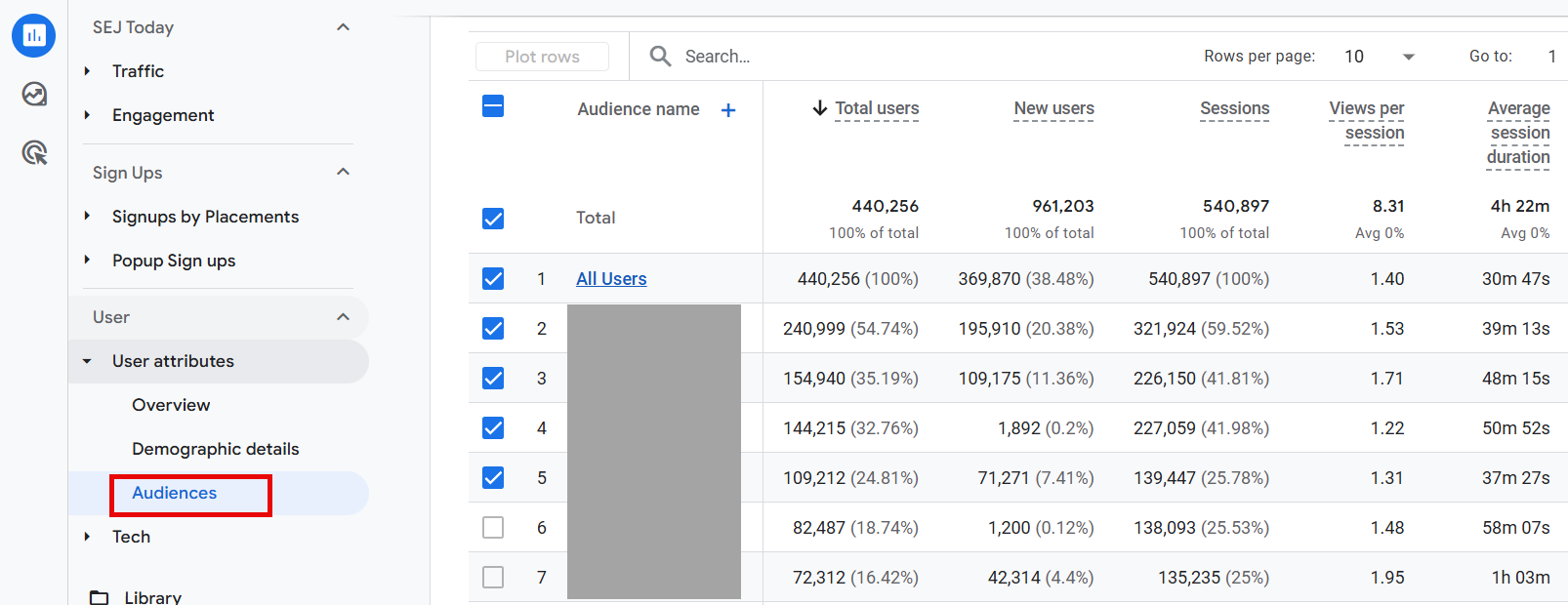
This report shows how predefined and custom audiences perform on key engagement and conversion metrics. For PPC marketers, the value lies in analyzing audiences tied to meaningful actions rather than generic demographics.
Use this report to:
- Identify which audiences are generating actual conversions, not just traffic.
- Compare performance between converters, cart visitors, returning visitors, or high-interest users.
- Check which audiences deserve more aggressive bidding or budget allocation.
- Create and export high-performing audiences directly to Google Ads.
This report is far more actionable than traditional interest segments and better fits the structure of PPC campaigns today.
To find this report, navigate to: Reports > Users > User Attributes > Audiences.
This report is only useful if you have custom audiences set up in GA4. These are behavioral audiences that you define yourself, rather than pre-built segments like in-market or common interest audiences that you might see in Google Ads.
GA4 audiences are created from first-party actions such as page views, events, or conversion behavior, which makes them more relevant for PPC optimization but requires upfront configuration.
2. Site Search Report
The Site Search report remains one of the most underused tools for PPC expansion.
By analyzing what users are searching for as soon as they land on your website, you can gain direct insight into unmet expectations and intent gaps.
In GA4, Site Search data is stored under Event Tracking rather than in a standalone report.
For PPC teams, this report can:
- Inform keyword expansion using real user language.
- Highlight product or content gaps that impact conversion rates.
- Uncover discrepancies between advertising messages and on-site expectations.
Speaking of gaps, the Site Search report can also help product teams understand if there is additional demand for the products being offered.
Suppose you have a wedding invitation website that offers a good range of products for weddings with different themes.
When you use the Site Search report, you see more and more searches for “rustic” – but none of the website designs have that rustic feel!
This can inform product marketing that there is a demand for this type of product and they can take action accordingly.
To find the Site Search report, navigate to Reports > Engagement > Events.
Search for the view_search_results event and click on it.
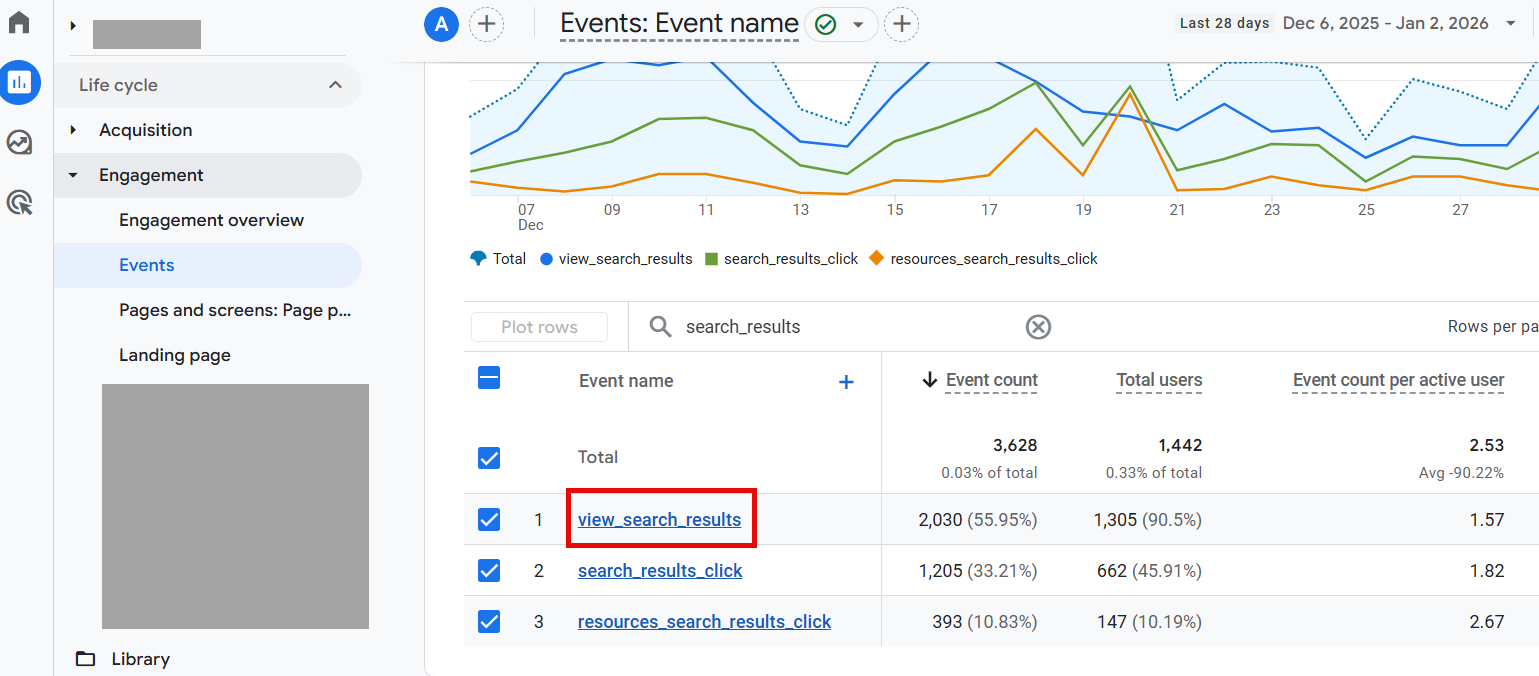
Once you click on it, you will find the custom parameter card “search_term” on the page.
A few important notes about search term data:
- Before using this report, you must create a new custom dimension (event-related) to populate the search term results.
- Google Analytics doesn’t show data until it reaches a minimum aggregation threshold.
Although it’s not as powerful as the previous Site Search report in Universal Analytics, it provides basic data on the number of events and total number of users per search term.
3. Recommendation report
Referral traffic is often ignored by PPC teams, which represents a missed opportunity.
The Recommendations Report shows which external websites direct users to your website and how those users behave when they arrive.
To find this report, navigate to Reports > Capture > Traffic Capture.
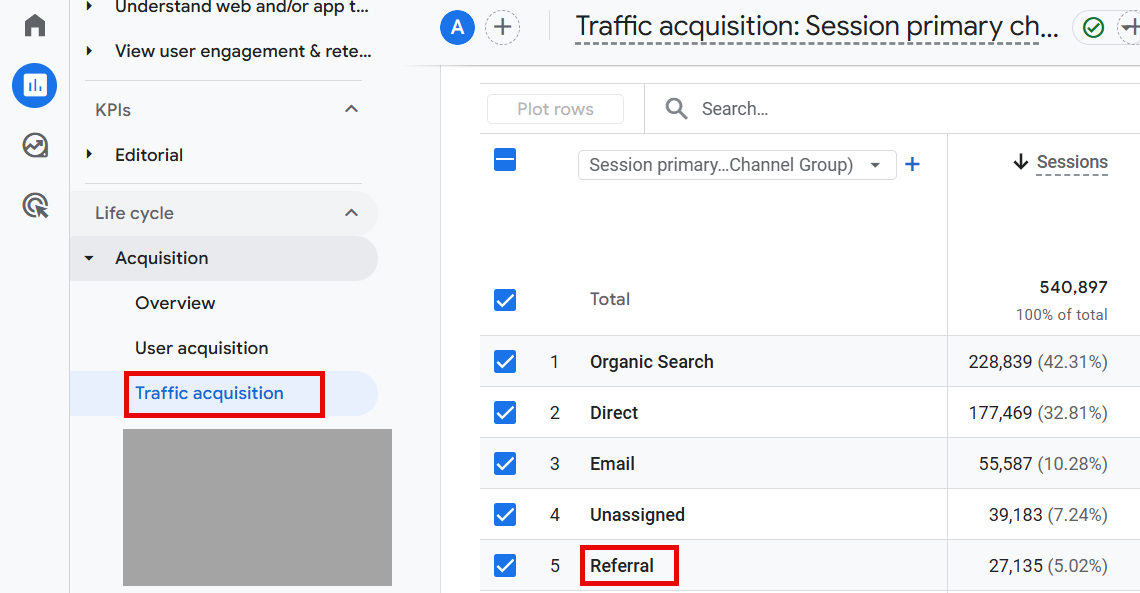
To view the websites via the recommendation channel, click the “+” in the default channel group and select “Session Source/Medium”.
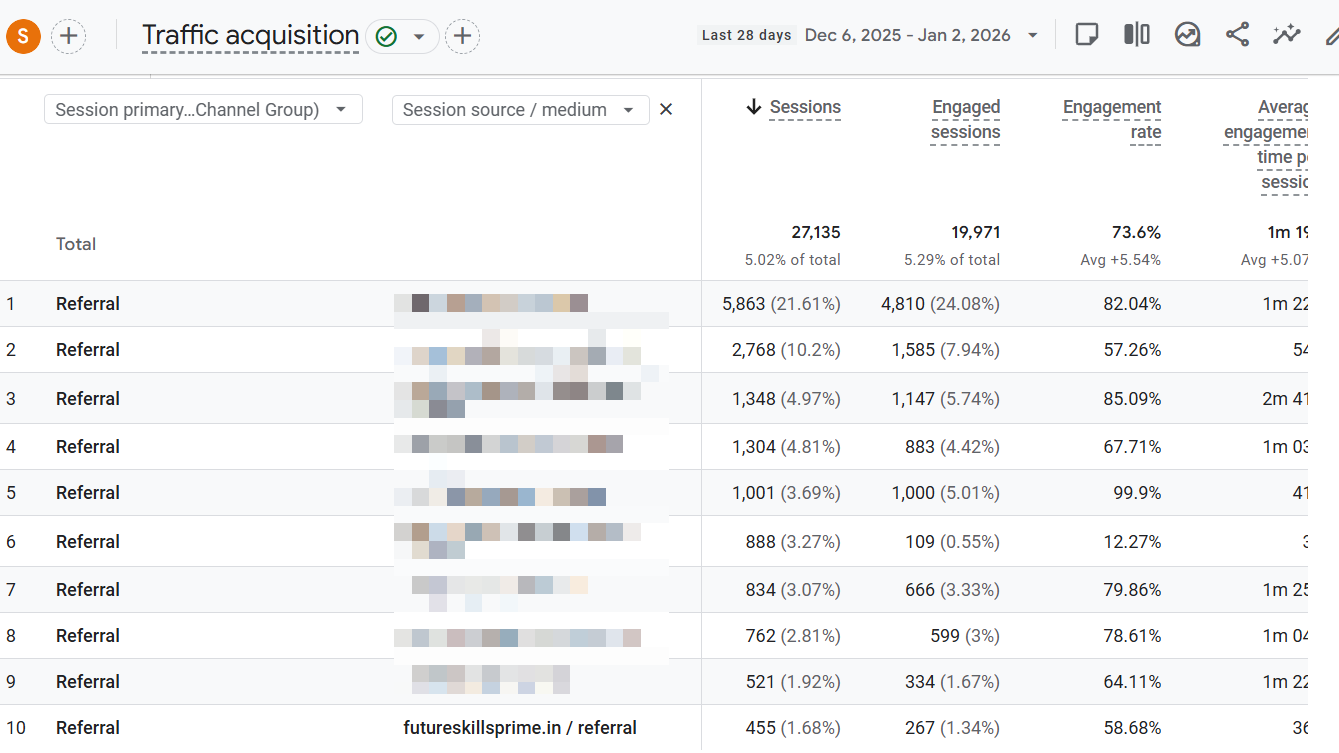
The main features of this report can be:
- Identify third-party sites that send high-quality traffic.
- Distinguish between low- and high-intent referral sources.
- Create placement-based audiences for display or demand generation testing.
Testing display placements based on proven referral sources can be a cost-effective way to expand reach without sacrificing traffic quality.
This is a cost-effective way to responsibly test expanding new PPC efforts because the referral sites you choose are known to deliver high-quality traffic to your site.
4. Top Conversion Paths Report
As marketers, we are often asked how top of funnel (TOFU) or brand awareness campaigns work.
Executives typically prioritize channels that are proven to work. Therefore, they want to ensure that marketing dollars are used efficiently.
In today’s economy this is more important than ever.
This Google Analytics report helps analyze and interpret TOFU behavior.
If you run campaigns of any kind beyond search, this report is absolutely necessary.
Of course, campaigns like YouTube and Display, as well as other paid channels like social media (Meta, Instagram, TikTok, etc.) have different goals and objectives.
TOF campaigns are undoubtedly criticized for not performing “as well” as a search campaign.
As a marketer, it can be frustrating to hear this over and over again.
Using the Conversion Path report provides a holistic view of how long it takes for a user to ultimately make a purchase from the first interaction.
To find this report, navigate to Advertising > Attribution > Conversion Paths.
When drilling down on the performance of a specific campaign, I recommend the following:
- Add a filter that includes “session source/medium” for the specific paid channel (e.g. “google/cpc”).
- Add an “AND” statement to the “Session Campaign” filter specific to the TOF campaigns in question.
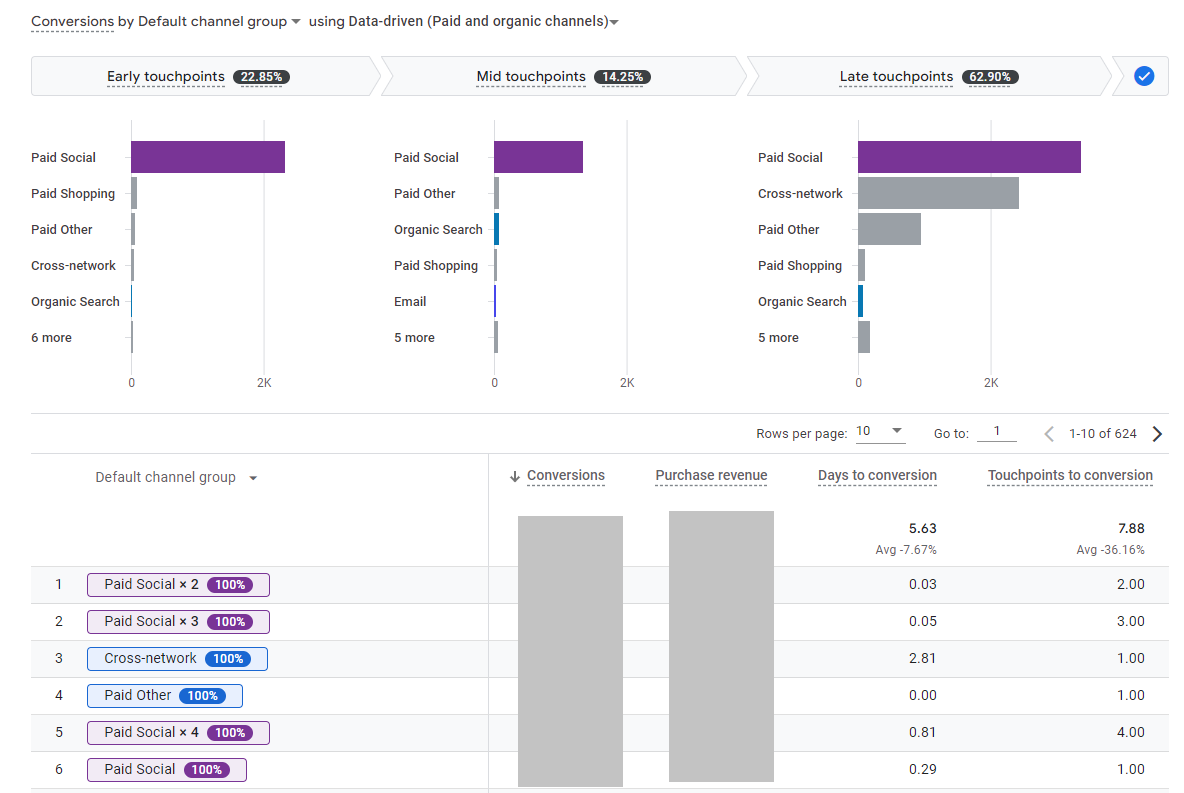
In the example above, we realized that our paid social campaigns should have been credited at more early and mid-touchpoints!
The main features of this report can be:
- Identify how many touchpoints lead to the final conversion.
- Analyze complex user journey interactions when multiple channels are involved (especially with longer sales cycles).
- Credited conversions report based on attribution model.
This report can uncover the necessary data to support the request for additional marketing dollars in TOF channels.
A win-win situation for everyone involved.
5. Conversion events report
Most PPC accounts optimize for a single primary conversion. This makes sense when bidding, but rarely tells the whole story about how paid traffic actually contributes to sales.
The Conversion Events Report in Google Analytics 4 allows you to take a step back and evaluate all meaningful actions that users take, not just the last one to gain recognition on the platform.
When making PPC decisions, this report helps answer questions that Google Ads alone cannot answer, such as:
- What actions regularly happen before a purchase or lead submission?
- Whether certain campaigns generate strong intent but don’t complete immediately.
- How different paid channels impact early engagement versus final conversion.
This is especially important when evaluating display, YouTube, demand gen, or paid social campaigns. These campaigns often seem inefficient when judged solely on last-click performance, but they can drive important actions such as product views, pricing page visits, form launches, or repeat sessions.
To find this report, navigate to: Reports > Engagement > Events.
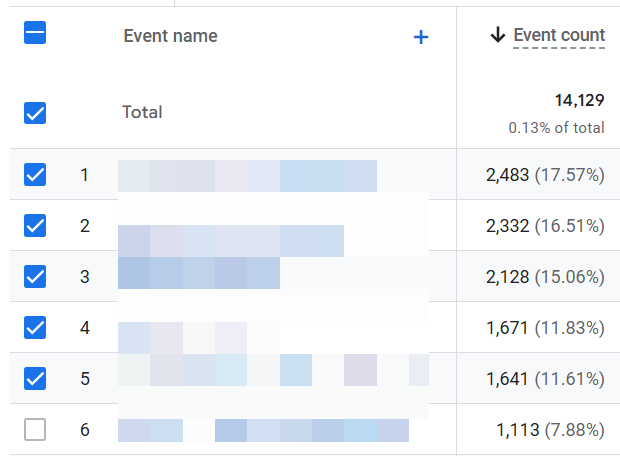
Conversion analysis in GA4 depends on which events you explicitly mark as conversions in the admin settings. GA4 does not provide a standalone “conversion only” filter in the events report, so accuracy starts with proper event configuration.
Another practical use of this report is to diagnose dispensaries. If a campaign drives a high volume of early conversion events but struggles to generate final conversions, the problem may be with the landing page experience, form friction, or follow-up timing rather than targeting or bidding.
Combined with Google Ads campaign-level filters, the Conversion Events report helps PPC managers explain Why A campaign is important, even if it’s not the final touch.
This context is often the difference between abandoning a campaign too soon and scaling a campaign that quietly does its job.
Turn analytics into better PPC decisions
Google Analytics is not where most PPC optimization is done on a daily basis. This work still lives on on advertising platforms.
But these reports serve a different purpose. They help PPC managers take a step back and understand how paid traffic behaves once it reaches the site, how users move across channels, and what actions actually signal intent.
When used monthly or quarterly, these reports reveal patterns that are often missed during daily account reviews. They support smarter targeting decisions, clearer benefit statements and more confident budget conversations.
When you focus on the reports that consistently answer real PPC questions, Google Analytics becomes less of a chore and more of a strategic advantage.
Additional resources:
Featured Image: MR Chalee/Shutterstock
Follow us on Facebook | Twitter | YouTube
WPAP (907)
